
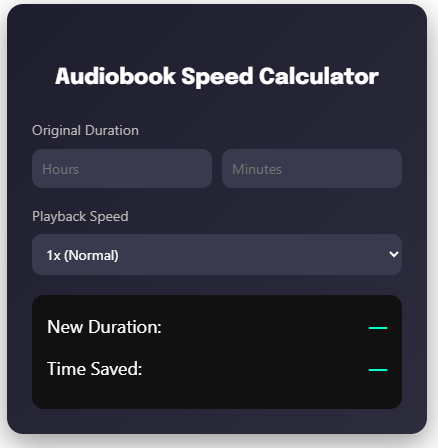
Do you have a growing list of audiobooks waiting to be heard but not enough time to listen? Whether you’re commuting, exercising, or multitasking, knowing exactly how long your audiobook will take at different playback speeds helps you plan better and finish more books. Our free audiobook speed calculator instantly shows you how much time you’ll spend listening—and how many hours you’ll save by adjusting your playback speed.
With audiobook platforms offering speeds from 0.5x to 3x, you can customize your listening experience to match your schedule, comprehension level, and personal preferences. Use the calculator above to see exactly how different speeds affect your audiobook completion time.
Audiobook Speed Calculator
What is an Audiobook Speed Calculator and Why Do You Need It?
An audiobook speed calculator is a simple tool that helps you determine how long an audiobook will take to finish based on your chosen playback speed. Unlike physical books where reading speed varies by individual, audiobooks give you complete control over narration speed—and understanding this relationship helps you make smarter listening choices.
Why calculate audiobook speed? Because time is valuable. If you’re listening to a 10-hour audiobook at 1.5x speed, you’ll finish in just 6 hours and 40 minutes—saving you over 3 hours. For avid audiobook listeners who consume multiple books monthly, these time savings add up dramatically. You can fit more books into your schedule, meet reading goals faster, or simply enjoy stories without sacrificing other commitments.
The calculator also helps you plan around deadlines. Students cramming for exams can calculate whether they have enough time to finish educational audiobooks. Commuters can find the perfect speed to complete a book during their weekly travels. Book club members can ensure they finish selections before discussion meetings.
How to Use the Audiobook Speed Calculator
Using our calculator above takes less than 30 seconds and requires just two simple inputs:
- Enter the Original Duration – Input your audiobook’s total length in hours and minutes (found on Audible, Spotify, Apple Books, or your audiobook platform)
- Select Your Playback Speed – Choose from common speeds: 1x (normal), 1.25x, 1.5x, 1.75x, 2x, 2.5x, or 3x
- Get Instant Results – The calculator immediately displays:
- New Duration: How long the audiobook will take at your selected speed
- Time Saved: How many hours you’ll save compared to normal speed
Pro Tips for Best Results:
- Start with 1.25x or 1.5x if you’re new to speed listening—these speeds maintain comprehension while saving significant time
- For non-fiction or educational content, use slower speeds (1.25x-1.5x) to absorb complex information
- For familiar genres or re-listens, experiment with 2x or faster to maximize time savings
- Track your actual listening sessions to find your “sweet spot” speed where comprehension and efficiency balance perfectly
Benefits of Using Different Audiobook Playback Speeds
Adjusting your audiobook speed offers powerful advantages beyond simple time savings:
Maximize Your Reading Goals – Speed listening helps you consume more books annually. At 1.5x speed, you can finish 50% more audiobooks in the same amount of time. Readers targeting 50 books yearly can achieve their goal while spending fewer total hours listening.
Maintain Focus and Engagement – Many listeners find that slightly faster speeds (1.25x-1.5x) actually improve concentration. The increased pace keeps your mind engaged and reduces the tendency to zone out during slower passages.
Adapt to Content Type – Different genres benefit from different speeds. Complex philosophy or dense business books might work best at 1.25x, while familiar fiction or memoirs flow smoothly at 2x. Having precise time calculations helps you plan which books to tackle at which speeds.
Save Hours Every Month – Consider this: if you listen to 4 audiobooks monthly at 10 hours each (40 total hours) at normal speed, switching to 1.5x speed reduces your time to 26.7 hours. That’s 13.3 hours saved every month—nearly 160 hours yearly that you can reinvest in more books or other activities.
Practical Examples: When to Adjust Your Audiobook Speed
Real-world scenarios where the audiobook speed calculator becomes invaluable:
The Busy Professional – Sarah commutes 5 hours weekly and wants to finish a 12-hour business audiobook before Monday’s meeting. Using the calculator, she determines that at 2x speed, she’ll complete it in 6 hours—perfectly fitting her commute schedule with an hour to spare.
The Student Studying – Marcus needs to finish a 15-hour educational audiobook for his exam in 2 weeks. He has 8 hours total to dedicate. The calculator shows that at 2x speed, he’ll need 7.5 hours—achievable within his time budget.
The Book Club Member – Jennifer’s book club selection is 20 hours long, but she only has 10 hours before the discussion meeting. At 2x speed, she can finish exactly on time.
The Genre Enthusiast – David re-listens to his favorite fantasy series while exercising. Since he knows the plot, he uses 2.5x speed to save time while still enjoying the narration, completing the entire series 60% faster than normal speed.
The Long Commuter – Rachel has a 2-hour daily commute (10 hours weekly). She uses the calculator to determine she can finish two 10-hour audiobooks monthly at 1.5x speed, versus just one at normal speed—doubling her reading output.
Frequently Asked Questions About Audiobook Speed
Does listening to audiobooks at faster speeds affect comprehension?
Research shows that most people can listen at 1.5x-2x speed without significant comprehension loss. Your brain adapts quickly to faster narration. Start at 1.25x and gradually increase—you’ll likely find your comprehension remains strong up to 1.75x or 2x for most content. Complex material may require slower speeds.
What’s the best audiobook playback speed for beginners?
Start with 1.25x speed. This modest 25% increase saves substantial time (a 10-hour book takes 8 hours) while feeling natural within days. After one week, try 1.5x. Most listeners settle between 1.5x-2x as their comfortable long-term speed.
Is the audiobook speed calculator free to use?
Yes, completely free with unlimited calculations. No registration, subscriptions, or hidden fees. Calculate as many audiobooks as you’d like and bookmark this page for quick access.
How accurate is the time saved calculation?
Extremely accurate. The calculation is straightforward mathematics: new duration equals original duration divided by playback speed. Time saved is the difference. The only variable is whether you actually listen at the selected speed consistently.
Can I use speeds faster than 3x?
While some audiobook apps offer speeds up to 4x or 5x, most listeners find comprehension drops significantly above 3x. For retention and enjoyment, 1.5x-2.5x is the optimal range for most content. Use our calculator to see if your desired listening time is achievable within reasonable speed limits.
Does audiobook speed affect the narrator’s voice quality?
Modern audiobook apps use advanced algorithms that maintain voice pitch even at faster speeds. At 1.5x-2x, narrators sound natural—just faster. At 2.5x-3x, you may notice slight quality changes, but the content remains clear and understandable.
How do I find my audiobook’s original length?
Check your audiobook platform: Audible shows duration on book details pages, Spotify displays total time in the player, Apple Books lists length in the book description, and Google Play Books shows duration on the product page. Use this exact duration in the calculator for accurate results.
Should I use different speeds for fiction vs non-fiction?
Many listeners do. Fiction often works well at 1.75x-2.5x since plot-driven narratives maintain clarity at higher speeds. Non-fiction, especially educational or technical content, often benefits from 1.25x-1.5x to ensure you absorb complex concepts. Use the calculator to find speeds that fit your schedule for each type.

